---
title: "Engagement: Microapp Analytics"
description: Microapp Analytics are a great way for users to gain insights into how a specific microapp's pages and adaptive formats are performing. Using engagement data Tiled users will be able to better underst
---
[Skip to content](https://support.tiled.co/engagement-microapp-analytics#main-content)
English
Show submenu for translations
[Submit a request](https://support.tiled.co/kb-tickets/new)
![logo-horizontal\_w.png\]](https://support.tiled.co/hs-fs/hubfs/logo-horizontal_w.png?height=30&name=logo-horizontal_w.png)
Open main navigation
Close main navigation
- English
Show submenu for translations
- [Submit a request](https://support.tiled.co/kb-tickets/new)
Hi, how can we help you?
- There are no suggestions because the search field is empty.
1. [Support](https://support.tiled.co/)
2. [Sharing & Analytics](https://support.tiled.co/sharing-analytics)
3. [Microapp Analytics](https://support.tiled.co/sharing-analytics#microapp-analytics)
# Engagement: Microapp Analytics
Microapp Analytics gives you a per-microapp engagement view — page-level data, adaptive-format breakdowns, top viewers, and recent activity — all in one place. This article walks through each section of the report, shows you how to filter and export data, and calls out where Builder 1.0 and Builder 2.0 experiences differ.
### **[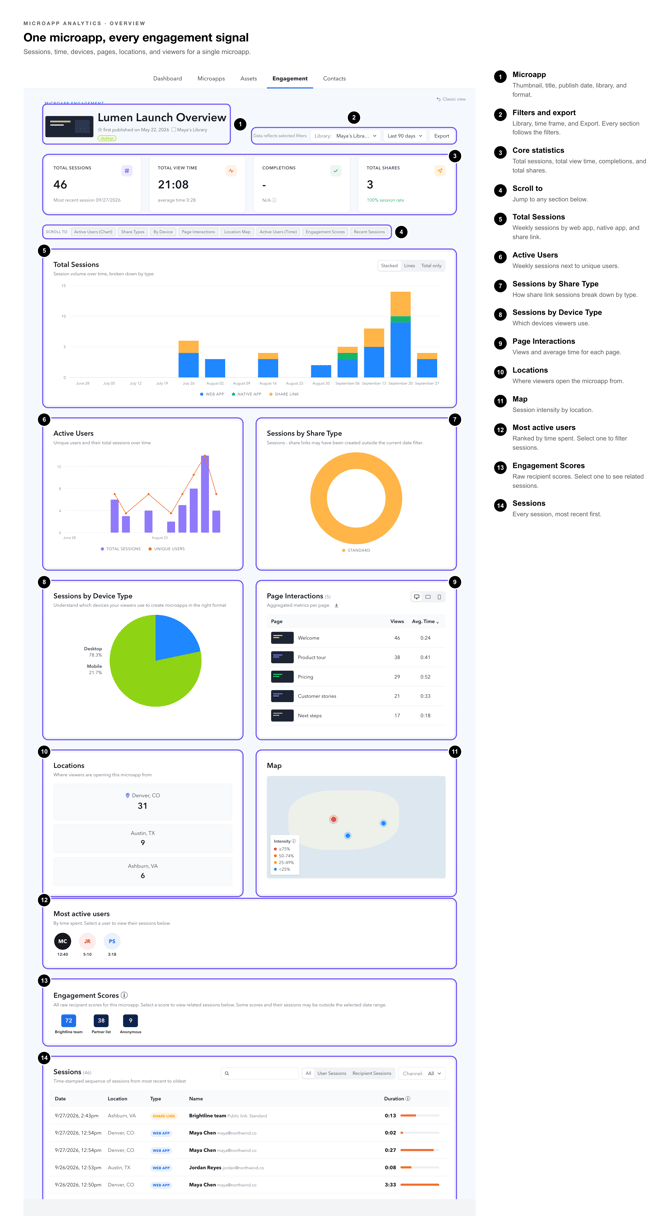](https://support.tiled.co/hubfs/Microapp%20Analytics%20Callouts-overview.png)Opening Microapp Analytics**
There are two ways to reach the analytics view for a specific microapp.
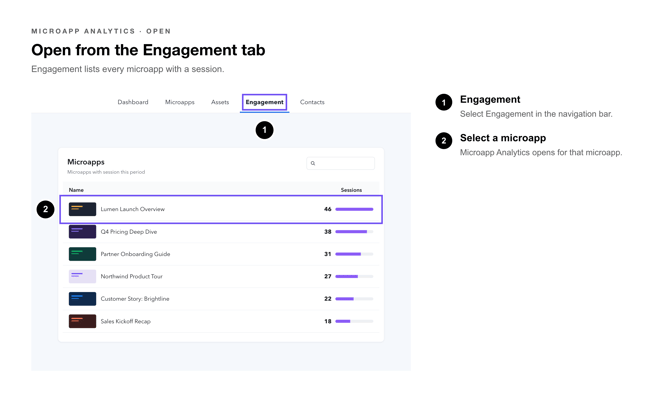
### **From the Engagement tab**
1\. **Sign in** — to your Tiled account and click Engagement in the left navigation.
2\. **Select** — a microapp from the list. The Microapp Analytics view opens.
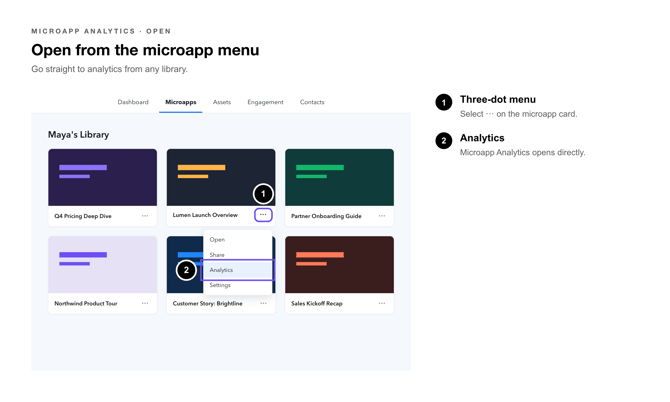
### [](https://support.tiled.co/hubfs/Microapp%20Analytics%20Callouts-01_open_from_engagement_tab_select_microapp.png)**From the Microapp three-dot menu**
1\. **Open** — any library and find the microapp you want to review.
2\. **Click** — the three-dot (⋯) menu on the microapp card.
3\. **Select** — Analytics. The Microapp Analytics view opens directly.
[](https://support.tiled.co/hubfs/Microapp%20Analytics%20Callouts-2-open-from-microapp-menu.png)
| **Pro Tip:** Bookmarking the Microapp Analytics URL lets you jump straight to a specific microapp’s report without navigating through the Engagement tab each time. |
| --- |
### **Filtering Data**
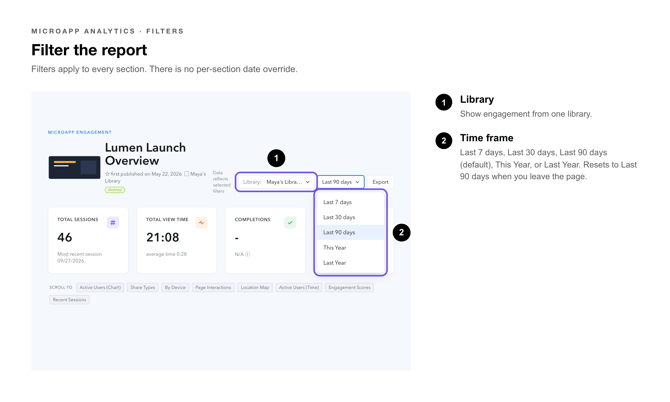
The date-range filter at the top of the page controls the data displayed in every section of the report. Click the filter dropdown to choose a preset:
| **Time Frame** | **What it covers** |
| --- | --- |
| **Last 7 days** | The previous 7 calendar days |
| **Last 30 days** | The previous 30 calendar days |
| **Last 90 days** | The previous 90 calendar days (default) |
| **This Year** | January 1 of the current calendar year through today |
| **Last Year** | January 1 through December 31 of the previous calendar year |
The filter applies to all sections — Core Statistics, Most Active Users, Activity By Page, and Recent Activity — simultaneously. There is no per-section date override.
[](https://support.tiled.co/hubfs/Microapp%20Analytics%20Callouts-3-filter-report.png)
| **Pro Tip:** Use Custom Range when you need a period that repeats reliably. Setting both a Start Date and an End Date closes the window, so the same April report returns the same numbers whether you run it in May or next January. Setting only a Start Date leaves the window open-ended through today, and the totals will keep growing. |
| --- |
| **Heads Up:** The filter resets to Last 90 days each time you leave and return to the page. If you need to share a specific time range with a colleague, export the data to CSV instead. |
| --- |
### **Exporting Data**
Tiled offers two export paths from Microapp Analytics. Choose the one that matches what you need.
### **Standard CSV Export**
The standard export captures all engagement activity for the microapp across the selected date range into a single downloadable [exported to a CSV.](https://support.tiled.co/hc/en-us/articles/1500002218081)
1\. **Set** — the date-range filter to the period you want to export.
2\. **Click** — the Export CSV button (top-right of the page).
3\. **Download** — the file from the confirmation prompt. The CSV opens in any spreadsheet application.
The standard CSV includes: viewer name and email, page visited, time on page, total session duration, date and time of visit, and share-link source if applicable.[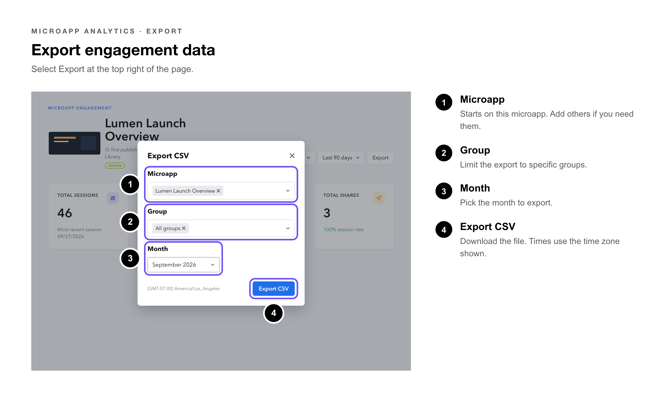](https://support.tiled.co/hubfs/Microapp%20Analytics%20Callouts-export_4engagement_data.png)
### **Page-Level CSV Export (Activity By Page)**
Introduced in v64, the Page-Level CSV breaks engagement down by individual page. Because large exports can be slow to generate, Tiled sends this file to your email address rather than offering an instant download.
1\. **Scroll** — to the Activity By Page section.
2\. **Click** — Export CSV next to the section header.
3\. **Select** — the date range in the picker that appears (the range can differ from the global filter).
4\. **Click** — Send Report. Tiled emails the CSV to your account email address.
| **Heads Up:** Check your spam folder if the email does not arrive within a few minutes. The from address is notifications@tiled.co. |
| --- |
### **Core Statistics**
The top of the Microapp Analytics page shows four summary metrics for the selected date range:
| **Metric** | **What it measures** |
| --- | --- |
| **Views** | Total number of times the microapp was opened, including repeat views by the same person. |
| **Unique Viewers** | Number of distinct people who opened the microapp at least once. |
| **Avg. Time Spent** | Average time per session that viewers spent actively engaging with the microapp. |
| **Completion Rate** | Percentage of viewers who reached the last page of the microapp. |
[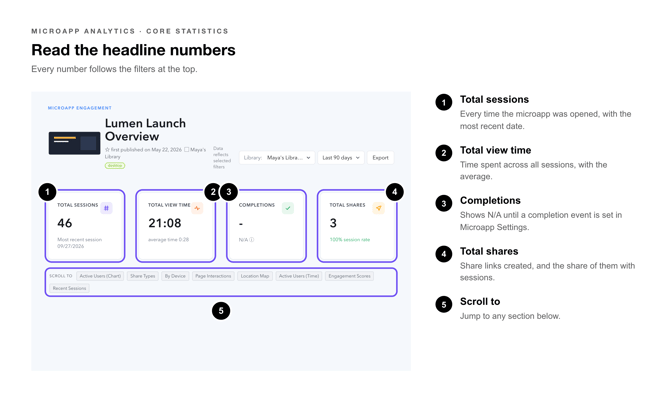](https://support.tiled.co/hubfs/Microapp%20Analytics%20Callouts-read-headline-microapp-numbers.png)These numbers update in near-real time as new engagement comes in. Refresh the page to see the latest counts and where they are by locations and on a map.
[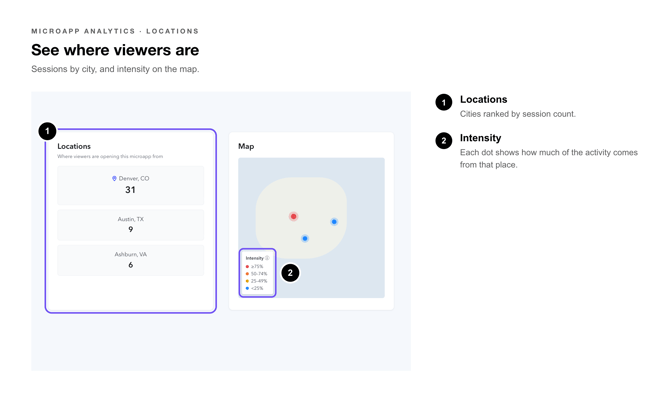](https://support.tiled.co/hubfs/Microapp%20Analytics%20Callouts-location-microapp%20viewers.png)
| **Pro Tip:** A high Views count with a low Completion Rate often signals that early pages are not compelling enough to keep viewers moving forward. Use Activity By Page data to pinpoint where drop-off happens. |
| --- |
### **Most Active Users**
**[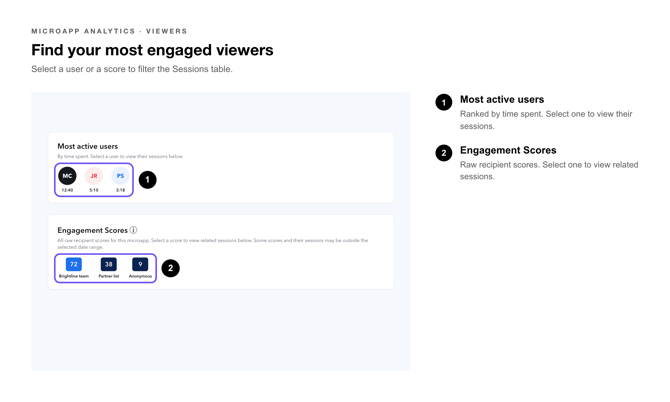](https://support.tiled.co/hubfs/Microapp%20Analytics%20Callouts-most-engaged-viewers-microapp.png)**
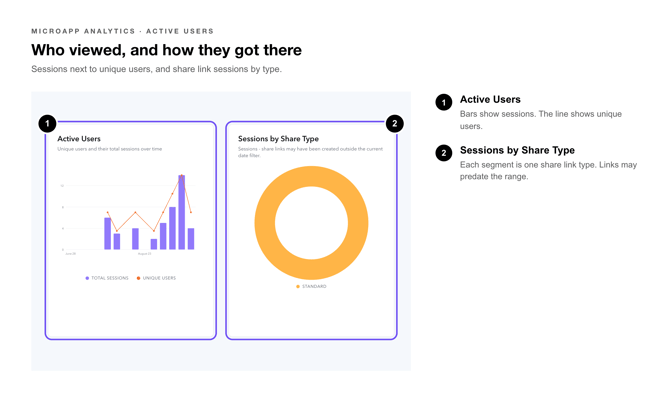
The Most Active Users panel lists the top viewers for the microapp in the selected date range, ranked by total time spent. Each row shows:
• Viewer name and email address (if captured)
• Number of sessions (total times the viewer opened the microapp)
• Total time spent across all sessions
• Last visited date
Click any viewer row to open the individual viewer report, which shows a session-by-session breakdown including which pages they visited and for how long.
[](https://support.tiled.co/hubfs/Microapp%20Analytics%20Callouts-active-users-microapp.png)
| **Heads Up:** Viewers who accessed the microapp anonymously (no name or email entered) appear as “Anonymous” and are counted as a single aggregated entry. Capture viewer emails by enabling email gating on the share link. |
| --- |
### **Activity By Page**
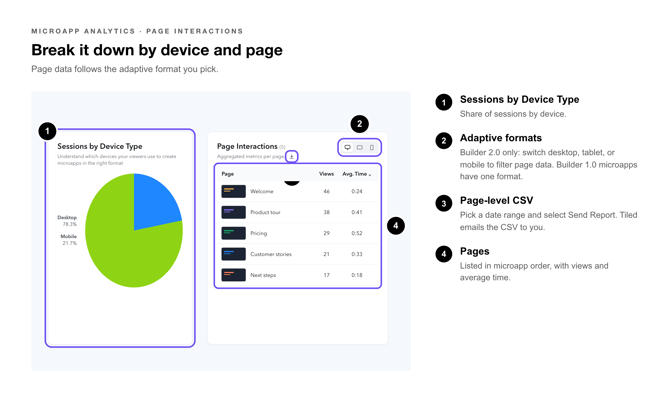
Activity By Page shows engagement broken down at the page level so you can see exactly which pages attract the most attention and which are skipped. The table includes:
[](https://support.tiled.co/hubfs/Microapp%20Analytics%20Callouts-breackdown-device-page-microapp.png)
| **Column** | **Description** |
| --- | --- |
| **Page** | The name assigned to the page in the microapp builder. |
| **Views** | How many times this page was visited within the selected date range. |
| **Avg. Time** | Average time viewers spent on this page per visit. |
| **Completion** | Percentage of viewers who reached this page out of all who opened the microapp. |
Pages are listed in the order they appear in the microapp, not by view count. Use the Export CSV button in this section to get a full page-level dataset delivered to your email (see Exporting Data above).
### **Switching Between Adaptive Formats**
| **Builder 2.0** |
| --- |
If the microapp was built in Builder 2.0 and has multiple adaptive formats — for example, a desktop version and a mobile version — a format switcher appears above the Activity By Page table. Click a format tab to filter the page-level data to that format only.
This lets you compare how the desktop and mobile layouts of the same microapp are performing independently, which is useful for confirming that all formats are being used as intended.
| **Pro Tip:** Microapps with a single format don’t show the format switcher. The Activity By Page table still shows full page-level data for them. |
| --- |
### **Recent Activity**
The Recent Activity feed shows a real-time log of individual engagement events. Each entry records:
• Viewer name (or “Anonymous”)
• Action taken — for example, Opened microapp, Visited page, Completed microapp
• Page name (for page-level events)
• Timestamp
The feed updates automatically as new events come in. It is capped at the 200 most recent events; use the CSV export for a complete history.[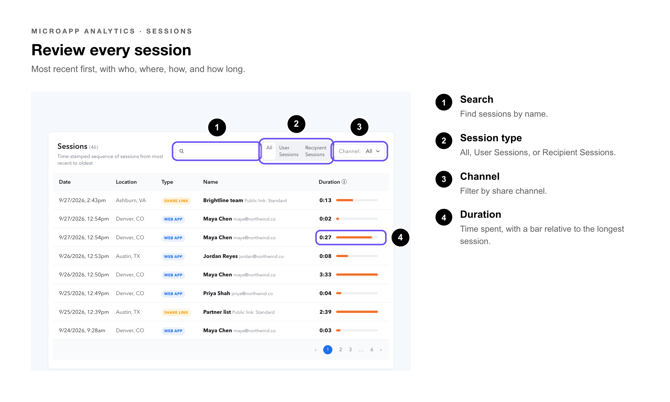](https://support.tiled.co/hubfs/Microapp%20Analytics%20Callouts-review-every-session.png)
| **Pro Tip:** Recent Activity is a great tool to monitor during a live presentation or sales call. Keep the tab open in a separate window to see real-time engagement from recipients you just shared with. |
| --- |
### **User Feedback**
The User Feedback section appears at the bottom of the Microapp Analytics page when viewer feedback has been collected through embedded feedback elements in the microapp. This section is under active development; additional feedback analytics are planned for a future release.
| **Heads Up:** User Feedback data is tied to specific feedback tiles placed by the microapp author. If no feedback tiles are present in the microapp, this section will be empty. |
| --- |
### **Other Libraries**
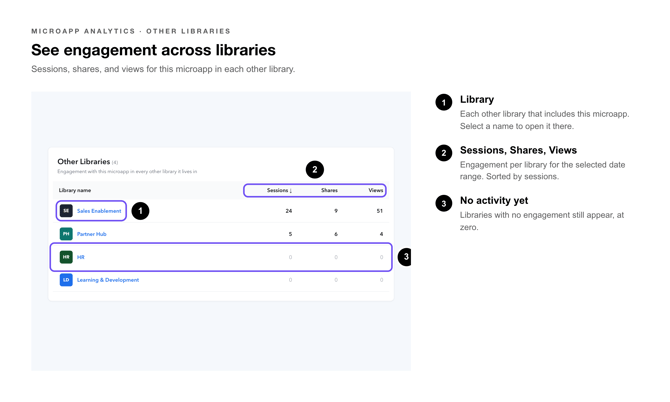
If the microapp has been shared to other Tiled libraries, the Other Libraries panel shows aggregated engagement from those libraries alongside your own. This gives you a complete cross-library picture without needing to switch accounts.
Click any library name in the panel to filter the Activity By Page and Recent Activity sections to events from that library only.
[](https://support.tiled.co/hubfs/Microapp%20Analytics%20Callouts-across_libraries.png)
| **Heads Up:** You must have at least Viewer access to a library to see its engagement data here. Libraries you do not have access to appear as “Restricted” in the list. |
| --- |
### **Common Questions**
| **Question** | **Answer** |
| --- | --- |
| **Why is my Completion Rate low?** | Completion Rate counts only viewers who reached the last page. If your microapp is long or non-linear, a lower rate is expected. Use Activity By Page to find which pages have the biggest drop-off and consider whether the navigation or content on those pages can be improved. |
| **Can I see data for a custom date range?** | Yes. Select Custom Range in the filter options and set a Start Date and End Date. Both dates are inclusive. Setting only a Start Date leaves the range open-ended through today, so set both when you need a figure you can reproduce later. |
| **Why do some viewers show as Anonymous?** | Viewers who open a microapp via a public share link without entering their name or email are tracked as anonymous. Enable email gating on the share link to require viewers to identify themselves before accessing the microapp. |
| **Why don’t I see the format switcher in Activity By Page?** | The format switcher only appears for microapps published in more than one adaptive format. A microapp with a single format shows its page-level data without it. |
| **How long does the page-level CSV email take to arrive?** | Most exports arrive within 2–5 minutes. Large microapps with high engagement volumes may take up to 15 minutes. Check your spam folder if it has not arrived after that window. |
| **Does Microapp Analytics track engagement from embedded microapps?** | Yes. Engagement from microapps embedded on external websites via the Embed on Webpage feature is captured and appears in Microapp Analytics alongside share-link and direct-access engagement. |
### **Related Articles**
• [**Sharing a Microapp**](https://support.tiled.co/public-links)— How to create share links and send direct shares to recipients.
• [**Engagement Overview**](https://support.tiled.co/engagement-overall-activity) — Account-wide engagement metrics and the sharing leaderboard.
• [**Pathway Analytics**](https://support.tiled.co/engagement-pathway-analytics) — See how viewers navigate through a microapp page by page.
• **[CSV Export: Downloading Engagement Data](https://support.tiled.co/export-engagement-analytics-csv)** — Full guide to exporting engagement data for any microapp.
• [**Analytics for Personalization**](https://support.tiled.co/analytics-for-personalization) — Track engagement on personalized versions of a microapp.
- [Getting Started](https://support.tiled.co/getting-started#main-content)
- [Intro to Tiled](https://support.tiled.co/getting-started#intro-to-tiled)
- [Tiled Library](https://support.tiled.co/getting-started#tiled-library)
- [Tiled Builder](https://support.tiled.co/tiled-builder#main-content)
- [Tiled Builder](https://support.tiled.co/tiled-builder#tiled-builder)
- [Microapp Tiles](https://support.tiled.co/tiled-builder#microapp-tiles)
- [Personalization](https://support.tiled.co/tiled-builder#personalization)
- [Asset Library](https://support.tiled.co/tiled-builder#asset-library)
- [Best Practices](https://support.tiled.co/tiled-builder#best-practices)
- [Tiled Tiles](https://support.tiled.co/tiled-tiles)
- [Settings](https://support.tiled.co/settings#main-content)
- [Account Settings](https://support.tiled.co/settings#account-settings)
- [Library Settings](https://support.tiled.co/settings#library-settings)
- [Microapp Settings](https://support.tiled.co/settings#microapp-settings)
- [Sharing & Analytics](https://support.tiled.co/sharing-analytics#main-content)
- [Microapp Analytics](https://support.tiled.co/sharing-analytics#microapp-analytics)
- [Personalization](https://support.tiled.co/sharing-analytics#personalization)
- [Sharing Microapps](https://support.tiled.co/sharing-analytics#sharing-microapps)
- [Useful Resources](https://support.tiled.co/useful-resources#main-content)
- [Additional Guides](https://support.tiled.co/useful-resources#additional-guides)
- [Developer Tools](https://support.tiled.co/useful-resources#developer-tools)
- [Accessibility](https://support.tiled.co/useful-resources#accessibility)
- [Tiled Mobile App](https://support.tiled.co/useful-resources#tiled-mobile-app)
- [Seismic](https://support.tiled.co/useful-resources#seismic)
- [Authentication & Security](https://support.tiled.co/useful-resources#authentication-security)
- [Builder 2.0](https://support.tiled.co/builder-2-0#main-content)
- [Tiled Builder 2.0](https://support.tiled.co/builder-2-0#tiled-builder-2-0)
- [Microapp Tiles 2.0](https://support.tiled.co/builder-2-0#microapp-tiles-2-0)
- [Personalization 2.0](https://support.tiled.co/builder-2-0#personalization-2-0)
- [Asset Panel 2.0](https://support.tiled.co/builder-2-0#asset-panel-2-0)
- [Layers & Settings 2.0](https://support.tiled.co/builder-2-0#layers-settings-2-0)
- [FAQ](https://support.tiled.co/builder-2-0#faq)
- [Tiled Plugins](https://support.tiled.co/tiled-plugins#main-content)
- [Figma Plugin](https://support.tiled.co/tiled-plugins#figma-plugin)
- [Adobe XD Plugin](https://support.tiled.co/tiled-plugins#adobe-xd-plugin)
- [Sketch Plugin](https://support.tiled.co/tiled-plugins#sketch-plugin)
- [Integrations](https://support.tiled.co/integrations#main-content)
- [CRM & Marketing Automation](https://support.tiled.co/integrations#crm-marketing-automation)
- [Content & Asset Management](https://support.tiled.co/integrations#content-asset-management)
- [Collaboration & Communication](https://support.tiled.co/integrations#collaboration-communication)
- [New Releases](https://support.tiled.co/new-releases#main-content)
- [v66.0.0](https://support.tiled.co/new-releases#v66-0-0)
- [v65.0.0](https://support.tiled.co/new-releases#v65-0-0)
- [v64.0.0](https://support.tiled.co/new-releases#v64-0-0)
- [v63.0.0](https://support.tiled.co/new-releases#v63-0-0)
- [v62.0.0](https://support.tiled.co/new-releases#v62-0-0)
- [v61.0.1](https://support.tiled.co/new-releases#v61-0-1)
- [v60.0.0](https://support.tiled.co/new-releases#v60-0-0)
- [v59.0.0](https://support.tiled.co/new-releases#v59-0-0)
- [v58.0.0](https://support.tiled.co/new-releases#v58-0-0)
- [v57.0.0](https://support.tiled.co/new-releases#v57-0-0)
- [v56.0.0](https://support.tiled.co/new-releases#v56-0-0)
- [v55.0.1](https://support.tiled.co/new-releases#v55-0-1)
- [v54.0.0](https://support.tiled.co/new-releases#v54-0-0)
- [v53.0.0](https://support.tiled.co/new-releases#v53-0-0)
- [v52.0.0](https://support.tiled.co/new-releases#v52-0-0)
- [v51.0.0](https://support.tiled.co/new-releases#v51-0-0)
- [v50.0.0](https://support.tiled.co/new-releases#v50-0-0)
- [Uncategorized](https://support.tiled.co/uncategorized)
[](https://tiled.co)
Copyright © 2026, Tiled
```json
{
"@context" : "https://schema.org",
"@type" : "VideoObject",
"contentUrl" : "https://4720090.fs1.hubspotusercontent-na1.net/hubfs/4720090/video_assets/223139291555/inherited/web_optimized.mp4",
"dateModified" : "2026-09-29T14:46:41.056Z",
"duration" : "PT1M24S",
"height" : 1080,
"name" : "Microapp Analytics Walkthrough Animation-1",
"thumbnailUrl" : "https://4720090.fs1.hubspotusercontent-na1.net/hubfs/4720090/Microapp%20Analytics%20Walkthrough%20Animation-1.mp4/medium.jpg",
"uploadDate" : "2026-09-29T14:46:41.053Z",
"width" : 1920
}
```