![logo-horizontal_w.png]](https://support.tiled.co/hs-fs/hubfs/logo-horizontal_w.png?height=30&name=logo-horizontal_w.png)
Authentication Token
To access the Tiled SCIM API, you'll need an authentication token. Include the token in the Authorization header as Bearer.
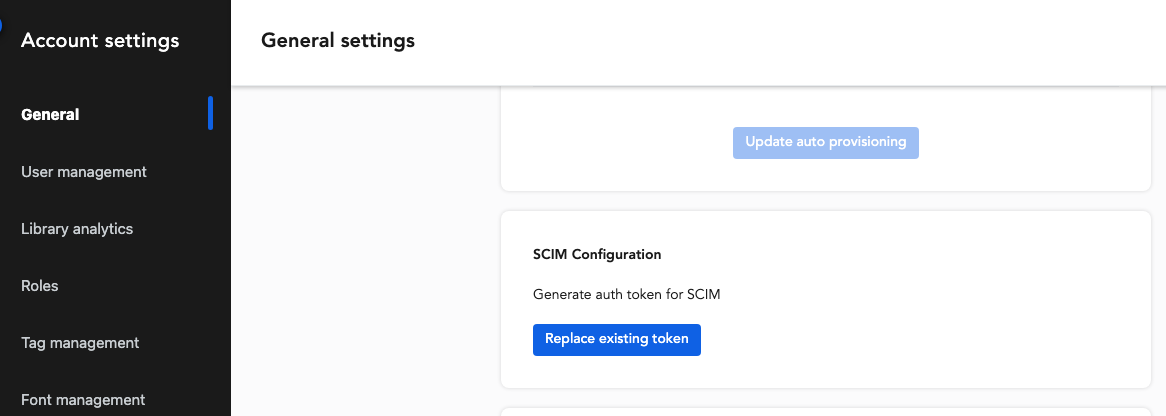
You can generate the token in the Tiled web application under Account Settings --> General under “SCIM Configuration.” Keep in mind that only one token is valid at a time. If you generate a new one or replace an existing one, it will invalidate the previous token.
Important: The token appears only once after generation, so be sure to copy and store it securely right away.
API endpoints
|
Endpoint |
Description |
|---|---|
|
Users |
|
|
GET /Users |
Returns a paginated list of users |
|
GET /Users/:id |
Retrieve a single user resource |
|
POST /Users |
Create a user |
|
PUT /Users/:id |
Update an existing user resource (overwrites all values) |
|
PATCH /Users/:id |
Update an existing user resource (overwrites specified values) |
|
DELETE /Users/:id |
Deletes a user |
|
Groups |
|
|
GET /Groups |
Returns a paginated list of groups |
|
GET /Groups/:id |
Retrieve a single group resource |
|
POST /Groups |
Create a group |
|
PUT /Groups/:id |
Update an existing group resource (overwrites all values) |
|
PATCH /Groups/:id |
Update an existing group resource (overwriting specified values) |
|
DELETE /Groups/:id |
Remove all members from the group (the group itself stays intact) |
Right now, only the eq operator is supported. If you try combining eq operator with other operators, you'll get an invalidFilter error, and the attribute query will be ignored.
Accepted filter queries for each resource type are:
-
User:
userName -
Group:
displayName
Pagination
Search results are paginated with a maximum of 100 items per page. You can optionally include startIndex and count in the body request. If these parameters are absent, they will default to startIndex=1 and count=10.
Patch Operations
Patch operations should use direct targeting (path mode); 0perations using filter mode will not be executed. Operations on non-existent resources or undefined schema attributes will be ignored without generating an error.
User Attributes
|
Field |
SCIM Attribute |
Attribute Type |
Notes |
|---|---|---|---|
|
Name |
|
Singular (complex) |
Required. Only sub-attributes |
|
|
|
Singular |
Required. |
|
Active |
|
Singular |
|
Include urn:ietf:params:scim:schemas:extension:tiled:2.0:User in the body request.
|
Field |
Custom Attribute |
Attribute Type |
Notes |
|---|---|---|---|
|
Admin |
|
Singular |
|
Users will be created in Tiled. If the user’s attribute isAdmin is missing or false, they'll be assigned to the account’s default configuration (library and role) or the default library as a base user.
Deprovisioning
You have two options:
- Users are deprovisioned with the
DELETEendpoint, which removes the user completely from the database and anonymizes their relates analytics data. - Users are deactivated using the
PUTendpoint with a request body containing the attributeactive=false. This action retains their records in the database, but they won't appear on the Tiled app User management page, but their analytics remain visible on the Engagement page, labeled as “(Deactivated) username”.
Note: You can't provision a user with an email address that already exists, even if that user has been deactivated. To free up the email for re-provisioning, manually update or delete the existing user's email address in Tiled first.
Group Attributes
|
Field |
SCIM Attribute |
Attribute Type |
Notes |
|---|---|---|---|
|
Name |
|
Singular |
Required. |
WORKING WITH GROUP
Groups map to libraries in Tiled. When you add members to a group, they'll be assigned to the corresponding library.