![logo-horizontal_w.png]](https://support.tiled.co/hs-fs/hubfs/logo-horizontal_w.png?height=30&name=logo-horizontal_w.png)
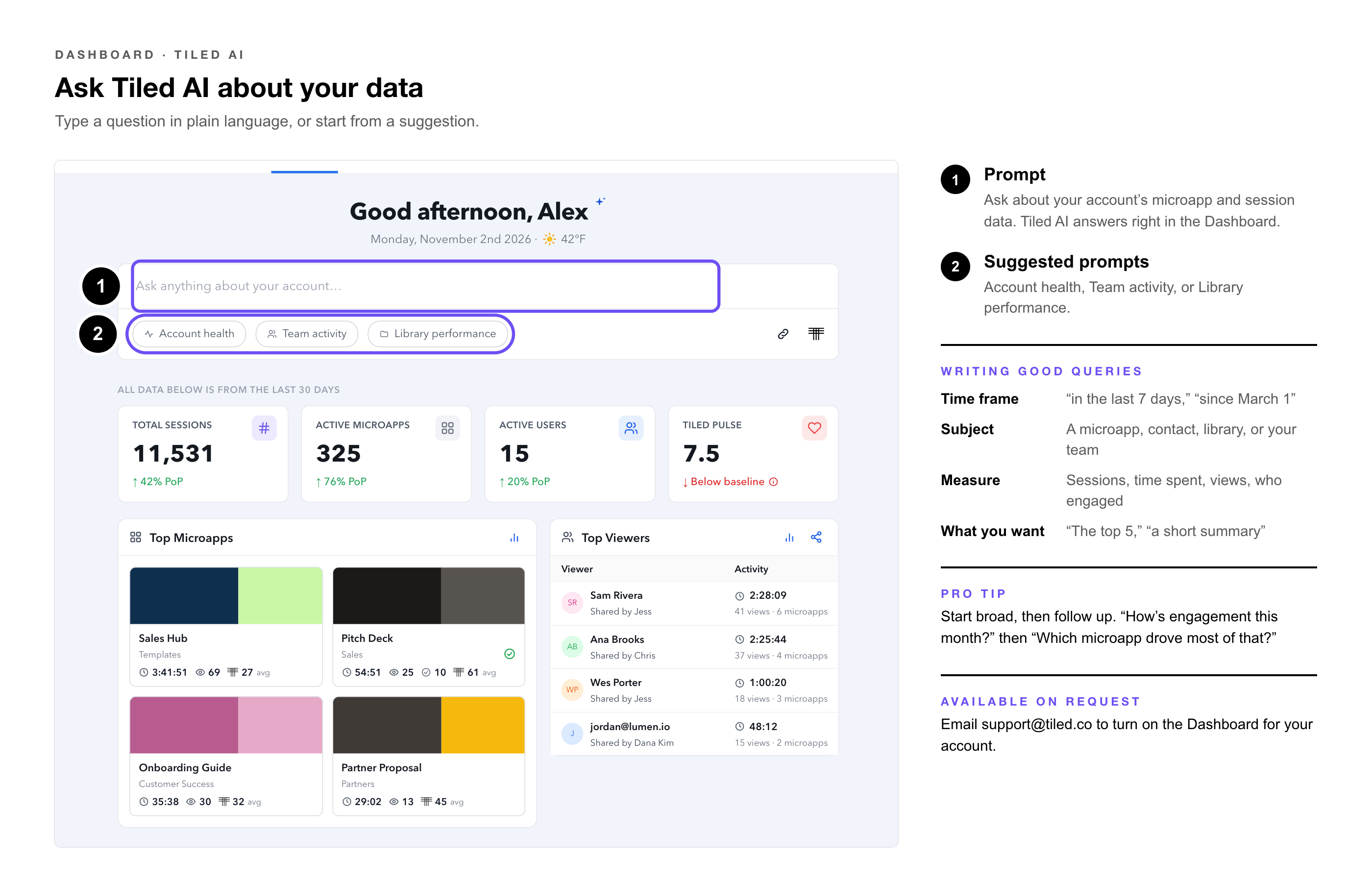
The prompt at the top of the Dashboard lets you ask Tiled AI about your engagement data in plain language. It looks through your account’s microapp and session data and answers right in the Dashboard. You can keep the conversation going with follow-up questions, so you can start broad and narrow down without starting over.
|
Available on Request: The Dashboard is available on request. Email support@tiled.co to turn it on for your account. |
Starting a Conversation
1. Type a question — in the prompt at the top of the Dashboard, or select a suggested prompt: Account health, Team activity, or Library performance.
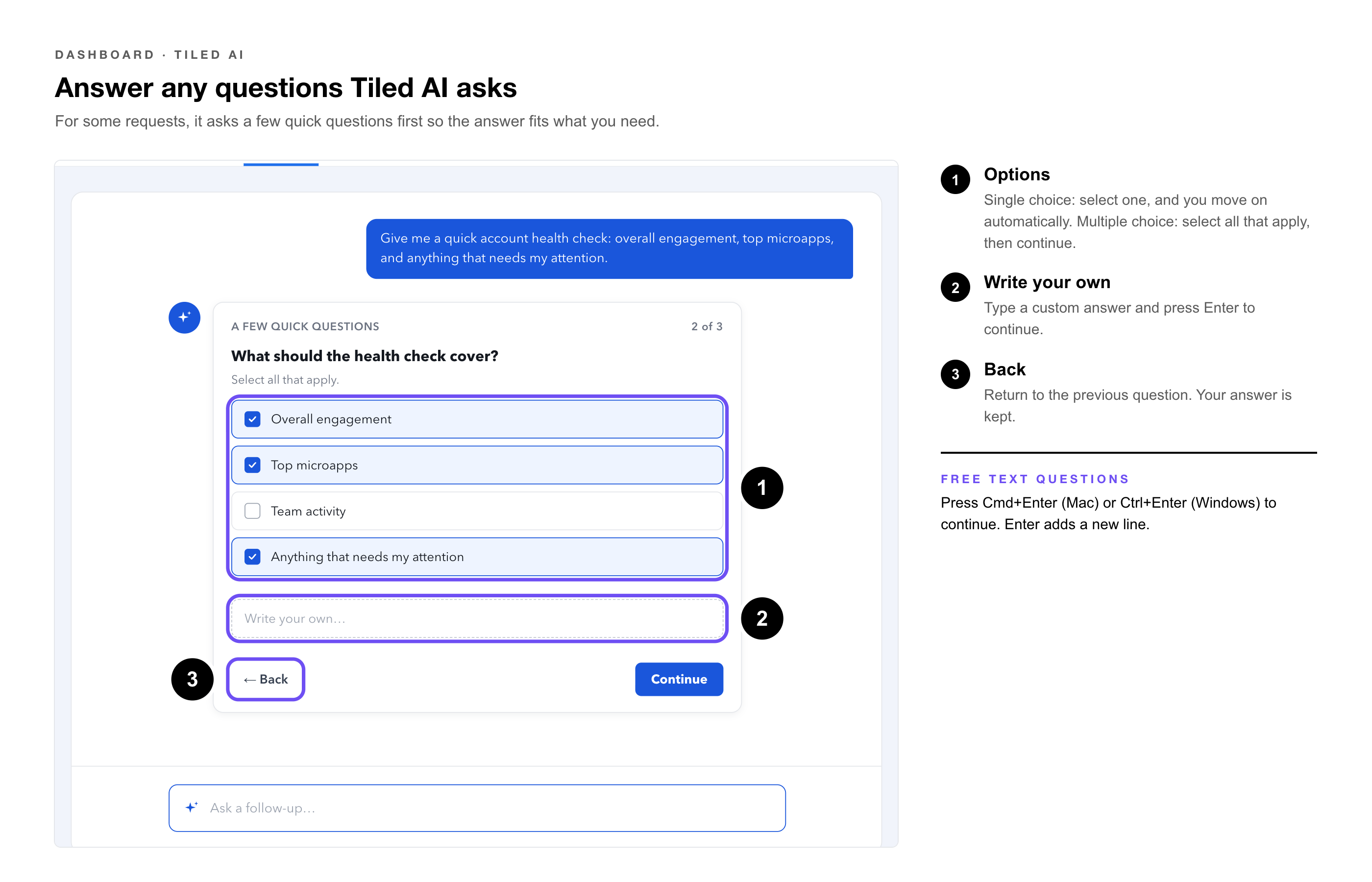
2. Answer any questions Tiled AI asks. — For some requests, it asks a few quick questions first so the answer fits what you need.
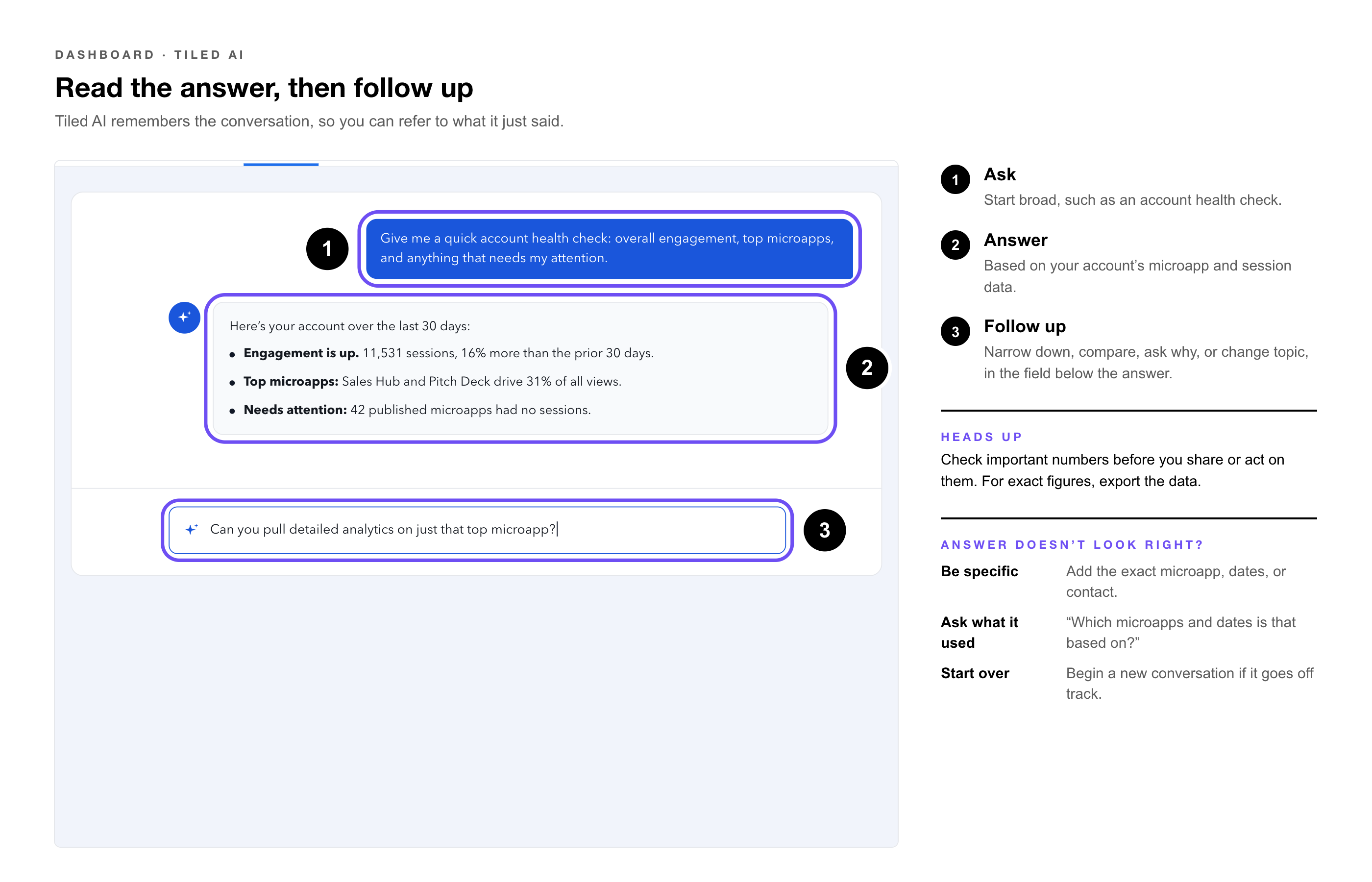
3. Read the answer, — then ask a follow-up in the field below it.
When Tiled AI asks you questions
|
Question Type |
How to Answer |
|
Single choice |
Select one option. You move to the next question automatically. |
|
Multiple choice |
Select every option that applies, then continue. |
|
Free text |
Type your answer. Press Cmd+Enter (Mac) or Ctrl+Enter (Windows) to continue; Enter adds a new line. |
|
Write your own |
Type a custom answer and press Enter to continue. |
|
Note: Select Back to return to the previous question with your answer kept. |
Writing Good Queries
|
Include |
Example |
|
A time frame |
“in the last 7 days,” “this month,” “since March 1” |
|
A subject |
a microapp name, a contact, a library, or your team |
|
The measure you care about |
sessions, time spent, views, pages viewed, who engaged |
|
What you want back |
“a list,” “the top 5,” “a short summary,” “what needs attention” |
|
Pro Tip: Start broad, then follow up. “How’s engagement this month?” followed by “Which microapp drove most of that?” usually gets you further than one long question. |
Example Queries
|
Goal |
Ask |
|
Account health |
“Give me a quick account health check: overall engagement, top microapps, and anything that needs my attention.” |
|
Trend |
“What’s our engagement trend over the last 30 days?” |
|
One microapp |
“How did [microapp name] perform in the last 7 days?” |
|
Quiet accounts |
“Which accounts went quiet this month?” |
|
Team activity |
“Who on my team shared the most this month?” |
|
Library performance |
“Compare engagement across our libraries this quarter.” |
|
One contact |
“What has [contact name] viewed, and for how long?” |
|
How-to |
“How do I add an overlay?” Tiled AI can answer from Tiled’s support articles. |
Following Up
After each answer, a follow-up field stays open. Tiled AI remembers the conversation, so you can refer to what it just said.
|
To |
Follow Up With |
|
Narrow down |
“Can you pull detailed analytics on just that top microapp?” |
|
Compare |
“How does that compare with last month?” |
|
Explain |
“Why do you think it dropped?” |
|
Get specific |
“Which pages did viewers spend the most time on?” |
|
Change topic |
“Now show me team activity for the same period.” |
|
Heads Up: Tiled AI answers from your account’s data, but always check important numbers before you share them or act on them. For exact figures in a report, export the data. See Exporting Dashboard Data to CSV. |
If an Answer Doesn’t Look Right
• Be more specific — add the exact microapp name, date range, or contact.
• Ask what it used — “Which microapps and dates is that based on?”
• Start over — if a conversation goes off track, start a new one.
|
Try It Yourself: Select Account health, then follow up three times: narrow to the top microapp, ask which pages held attention, and ask how it compares with last month. |
Common Questions
|
Question |
Answer |
|
What can I ask about? |
Your account’s engagement: microapps, sessions, viewers, and activity over time. |
|
Do I have to start over to ask something else? |
No. Use the follow-up field, even to change topic. |
|
Why did Tiled AI ask me questions first? |
To understand exactly what you need, so the first answer is closer to right. |
|
Are the numbers exact? |
Tiled AI works from your data, but for reporting, export the figures. |
Related Articles
• Getting Help in the Builder — The Help chat for how-to questions.
• Design Tools and AI in Tiled — Where AI helps in Tiled.
• Microapp Analytics — Full engagement for one microapp.
• The Dashboard: Overview — What’s on the Dashboard and how it’s laid out.
• The Dashboard for Admins — Account, library, and content performance.
• The Dashboard for Sales Reps — Your contacts, follow-ups, and live sessions.
• Attaching Files to a Dashboard Prompt — Giving Tiled AI documents and images to work from.
• Exporting Dashboard Data to CSV — Getting the numbers behind the Dashboard into a spreadsheet.